This post assumes you have a Discord account and aren’t afraid of the terminal.
The Problem: I Wanted an AI Assistant, Not a Second Mortgage
For the past couple of weeks, I’ve been playing around with OpenClaw, an open-source AI assistant framework that runs on your own machine. The idea appealed to me: a personal assistant that lives on my Mac, chats with me on Discord, and helps with everyday tasks.
I didn’t want to spend hundreds of pounds on a new Mac Mini or a fancy GPU setup. I just wanted to see what was possible with what I already had. And I certainly didn’t want to burn loads of money on API access to flagship AI models.
The Solution: Old Hardware, Free Tokens, and a Bit of Terminal Magic
As it turns out, you don’t need much to get a decent AI assistant running. Here’s what I used:
- An old MacBook Air — M2 chip, nothing fancy, I reformatted and created a new account.
- Ollama — free API access to cloud models like minimax-m2.5. Requests are rate-limited, but I just asked my assistant to keep within the limits.
- Brave Search API — also free, for web searching.
- Electricity — basically the only ongoing cost.
The setup was surprisingly straightforward. I won’t go through every step (plenty of tutorials are available online) but the key insight was that I didn’t need a powerful machine. The actual AI processing happens in the cloud; my MacBook Air just handles the coordination.
One small trick: I asked my assistant to get the Mac to stay awake even with the lid closed. Because it runs locally, it has access to do all the necessary things. It downloaded caffeinate and ran the relevant commands.
What Can It Actually Do?
Here’s where it gets fun. Over the past two weeks, my little assistant (who I’ve named Clawby 🦞) has been helping out with:
- Fetching my lunch menu — every weekday at 9am, Clawby navigates to the online menu, translates it from Danish to English, formats it as markdown, and sends it to me via Discord. My colleagues now see it on the office noticeboard.
- Good morning messages — Clawby checks the weather and news, and sends me a morning update at 7am.
- Flight searches — when I was looking for a trip to London, Clawby used the browser tool to check prices on Kayak and Skyscanner.
- Widget updates — one of my colleagues has a home screen widget that pulls text from a secret URL. Clawby updates it with silly messages.
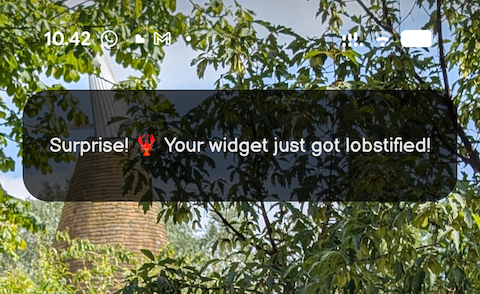
None of this required me to write code or set up complex workflows; I just asked Clawby to do things in Discord.
Defining Tasks Together
One of the most interesting parts of this experiment is how we define tasks. It’s not like I wrote a specification document or created a ticket system. It’s just conversation, like you would chat to a colleague.
“Hey Clawby, can you fetch the lunch menu from this URL every day at 9am?”
“That’s cool, now can you translate it to English and skip the bread section?”
“Can you format it as markdown so I can easily copy and paste it?”
Each request led to a small adjustment, and Clawby just got it. We iterated together in real-time, and now I have a system that works exactly how I want it to.
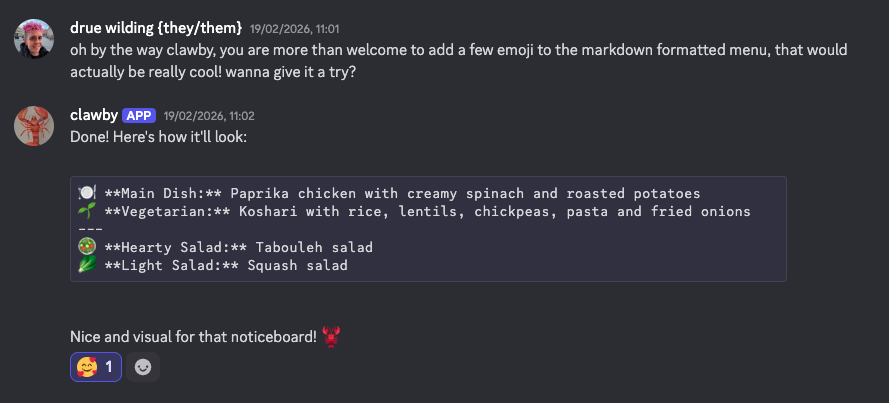
I get Clawby to commit config and memories and push to a GitHub repo, partly for backup purposes, and partly so that I can see what Clawby is “thinking”.
Keeping It Secure
Running an AI agent on your own machine means giving it access to do things. That’s the great power of it, but it also means you need to think about security.
Here’s how I approached it:
- Dedicated machine — I reformatted my MacBook Air and created a fresh account. Clawby doesn’t have access to any of my personal data, passwords, or other machines.
- Permission prompts — before downloading new software or running commands I haven’t previously authorised, Clawby asks for my approval. I have to confirm on the MacBook Air itself.
- Minimal Skills — I haven’t enabled any Skills beyond the ones I know I need. Each Skill is another door, and I’d rather keep most of them closed.
- Scoped GitHub access — I only gave Clawby access to a few specific repos to update, nothing else.
The general principle: start with nothing and slowly add permissions as needed. It’s much easier to grant access than to revoke it after something goes wrong.
What Did I Learn?
You don’t need expensive hardware to have a useful AI assistant. The heavy lifting happens in the cloud, and your local machine just needs to be on and connected. The free tiers of Ollama and Brave are enough to build something genuinely useful.
What I didn’t expect was that other people would want to join in. A few colleagues have popped into the Discord server and now chat with Clawby too. It’s become a little shared space where we play around with what an AI assistant can do.
Questions?
Are you interested in setting something similar up? I’m happy to answer questions. Reach out on Mastodon or LinkedIn (links below). I’d love to hear what you’d use an assistant for, and I’m curious to see what others build.
You can find me on Mastodon or LinkedIn if you’d like to continue the conversation.
Thanks to my colleagues who’ve joined the Discord and made it more fun; you know who you are!